


Clip properties
The Clip panel follows the primary selection. Shared controls appear only for compatible clip types, and a multiple-selection edit propagates only to compatible selected clips.
No selection
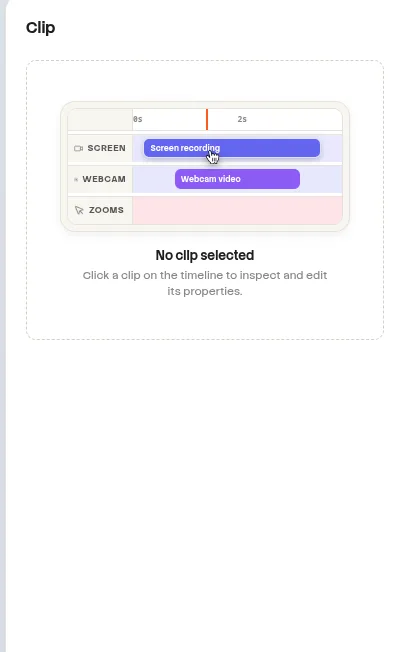
When no clip is selected, the panel shows an instructional empty state. Select an item on the canvas or timeline to reveal its properties.
website/docs/public/screenshots/editor/clip-empty.webpClip types
| Clip type | Properties exposed |
|---|---|
| Screen / Video | Visual layout, framing, transform, appearance, playback speed, transitions, enable, delete, and unlink when linked. |
| Image | Visual layout, framing, transform, appearance, transitions, enable, and delete. |
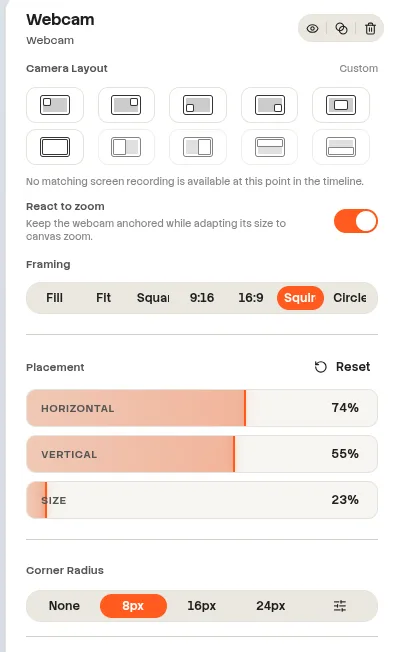
| Webcam | Shared visual controls plus split layout and React to Zoom. |
| Blur | Effect, shape, strength, feather, radius, tint, and color controls. |
| System / Microphone / Imported audio | Clip volume, Entry and Exit Fade transitions, enable, and delete. |
| Text caption | Text content, typography, alignment, color, outline, extrusion, backdrop, and shadow. |
| Keyboard caption | Caption styling plus Follow Cursor. |
Shared visual layout
| Property | Values or range | Behavior |
|---|---|---|
| Layout | Floating top-left, top-right, bottom-left, bottom-right; Floating center; Fullscreen | Webcam additionally supports Split left, right, top, and bottom. |
| Framing | Fill, Fit, Square, Portrait 9:16, Landscape 16:9, Squircle, Circle | Controls crop and mask presentation. |
| Position X / Y | −300% to 300% | Moves the visual on the canvas. |
| Width | 2%–400% | Height remains proportional when only width changes. |
| Corner radius | None, 8, 16, 24 px, or Custom 0–200 px | Rounds the visual mask. |
| Mirror | Horizontal and Vertical | Flips the rendered visual. |
| Playback speed | 0.25×–4×; presets 0.5×, 1×, 1.5×, 2×, 3× | Available for screen, video, and webcam clips. |
| Enable / Disable | On or Off | Disabled clips remain on the timeline but are not rendered. |
| Transitions | Open from the properties header | Entry and exit transitions are stored per clip. |
| Delete | Properties-header action | Removes the selected clip. |
| Unlink | Available for linked sidecars | Separates the clip from linked timeline movement. |
Shadow, border, and frame
| Group | Property | Values or range |
|---|---|---|
| Shadow | Preset | None, Soft, Medium, Strong, Custom |
| Shadow | Mode | Solid or Adaptive |
| Shadow | Custom blur | 4–96 px |
| Shadow | Direction | All, Bottom, Bottom-right, Top-left |
| Border | Enabled | On or Off |
| Border | Color | Color picker |
| Border | Width | 1–32 px |
| Frame | Style | None, Safari, Windows 95 |
| Frame | Title | Custom frame title |
| Frame | Chrome scale | 50%–200% |
| Frame | Specific controls | Menu, scrollbar, or colors depending on frame style |
Crop a visual clip
Crop is a direct canvas editor rather than a numeric Clip-panel group.
- Select exactly one screen, video, image, or webcam clip.
- Select Crop in the canvas toolbar.
- Move or resize the crop rectangle directly over the selected visual.
- Select OK to store the normalized crop on that clip.
Single selection required
Crop is unavailable without one compatible visual selection and does not operate on a multiple selection.
Initial visual defaults
| Clip | Transform and framing | Corner and shadow |
|---|---|---|
| Screen | Full canvas | No corner radius when no background; Medium shadow, 40 px blur, Bottom direction. |
| Video / Image | Full canvas | Small corner radius; Medium shadow, 20 px blur, All directions. |
| New Webcam | x 72%, y 72%, width 24%, height 24%; Squircle | Webcam appearance defaults then apply. |
Webcam clips
| Property | Values | Default or constraint |
|---|---|---|
| Split layout | Left, Right, Top, Bottom | Requires a linked screen clip. Otherwise: “No matching screen recording is available at this point in the timeline.” |
| Split ratio | 20%–80% | 50% |
| Split padding | 0%–8% | 0% |
| React to Zoom | On or Off | On |
website/docs/public/screenshots/editor/webcam-properties.webpBlur clips
| Property | Values or range | Conditional behavior |
|---|---|---|
| Light preset | Blur | Strength 30, feather 14, tint 0. |
| Privacy preset | Pixelated | Strength 72, feather 2, tint 0. |
| Strong preset | Opaque | Strength 100, feather 0, tint 0, color #000000. |
| Effect | Blur, Frosted, Pixelated, Opaque | Changes which controls remain visible. |
| Shape | Rectangle, Square, Circle | Circle hides corner radius. |
| Strength | 0%–100% | Hidden for Opaque. |
| Edge softness | 0%–100% | Controls feathering. |
| Corner radius | 0%–100% | Hidden for Circle. |
| Tint intensity | 0%–100% | Frosted only; entering Frosted uses at least 24%. |
| Color | Color picker | Frosted and Opaque only. |
Privacy effect
The effect is baked into the exported video. Increase strength or use Opaque for sensitive information.
Audio clip volume
This clip-level volume applies to selected system, microphone, or imported audio clips. Composition-wide and role-level volume controls are documented on the Audio page.
| Property | Range | Default |
|---|---|---|
| Volume | 0%–200% | 100% |
Text and keyboard captions
| Property | Values or range | Default or rule |
|---|---|---|
| Content | Custom text or generated sentence / keyboard step | Custom text does not propagate across multiple selection. |
| Font | Search installed fonts or import a font | Stored with caption styling. |
| Style | Bold, Italic, Strike-through | Independent toggles. |
| Alignment | Left, Center, Right | Caption text alignment. |
| Color | Color picker | Text fill color. |
| Line height | 0.8–2.0 | Caption style value. |
| Letter spacing | −5 to 20 px | Caption style value. |
| Font size | 12–256 px | Manual caption preference with 42 px creation fallback; panel fallback 36 px text / 28 px keyboard; AI captions use 36 px. |
| Wrap | On or Off | On |
| Outline | 0–30 px | Optional outline width. |
| Outline color | Color picker | Used when outline width is above zero. |
| Extrusion | 0–20 px | Optional depth effect. |
| Backdrop blur | 0–48 px | Blur behind the caption. |
| Text shadow blur | 0–50 px | Direction: All, Bottom, Bottom-right, Top-left. |
| Text shadow color | Color picker | Applied with the configured shadow blur and direction. |
| Follow Cursor | On or Off | Keyboard captions only; never propagated across multiple selection. |