


Recorder preferences
Open Preferences from the Recorder top bar. Settings are grouped into Recording, General, Shortcuts, and About, with advanced appearance and update controls where applicable.
Preferences window
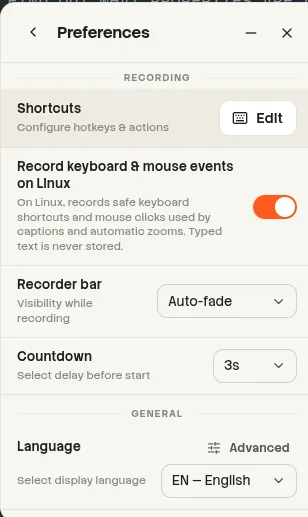
website/docs/public/screenshots/recorder/preferences.webpRecording settings
| Setting | Values | Default | Notes |
|---|---|---|---|
| Countdown | Off, 3 seconds, 5 seconds, 10 seconds | 3 seconds | Applied before capture starts. |
| Recorder Bar | Always visible, Auto-fade, Hidden until hovered | Always on Windows/macOS; Hidden until hovered on Linux | Controls the floating bar during capture. |
| Interaction access | Checking, Available, Permission required, Installation required, Denied, Unavailable | Off | Linux labels this Record keyboard & mouse events on Linux. |
| Record interactions | On or Off when available | Platform dependent | Stores supported clicks and safe shortcut tokens, never typed text. |
| Shortcuts | Open Shortcuts subview | Not applicable | Opens the Recording and Teleprompter shortcut groups. |
General settings
| Setting | Values | Default |
|---|---|---|
| Language | Bulgarian, German, English, Spanish, French, Hindi, Italian, Japanese, Korean, Polish, Portuguese (Brazil), Russian, Vietnamese, Simplified Chinese, Traditional Chinese | A supported system or browser language; English fallback |
| Theme mode | Light, Dark, System | Light |
| Spell check | On or Off under Advanced | On |
| Primary color | Preset palette or custom color picker | #ff5a1f |
| Secondary color | Preset palette or custom color picker | #6366f1 |
| Corner radius | 0, 6, 10, 16, 24 px, or Custom | 10 px |
| Pill radius | On or Off | Off |
| Surface tone | Default, Neutral, Slate, Deep | Default |
| Global UI scale | 50%, 75%, 100%, 125% | 100% |
Theme presets
Applying a preset sets both colors, corner radius, pill behavior, and surface tone together. Individual controls can then be changed.
| Preset | Primary | Secondary | Radius | Surface |
|---|---|---|---|---|
| Beam Sunset | #ff5a1f | #6366f1 | 10 px | Default |
| Cyber Violet | #8b5cf6 | #06b6d4 | 12 px | Slate |
| Emerald Forest | #10b981 | #f59e0b | 8 px | Neutral |
| Crimson Velvet | #f43f5e | #a855f7 | 14 px | Deep |
| Oceanic Breeze | #0284c7 | #14b8a6 | 10 px | Slate |
| Amber Studio | #f59e0b | #ec4899 | 4 px | Neutral |
| Sakura Bloom | #ec4899 | #8b5cf6 | 18 px | Default |
| Slate Precision | #0ea5e9 | #64748b | 2 px | Slate |
Interface scale overrides
Top bar, Sidebar, Properties, Canvas controls, and Timeline can each use the global scale or override it with 50%, 75%, 100%, or 125%. Use global is represented by an empty override, so changing the global scale continues to affect that region.
| Region | Choices |
|---|---|
| Top bar | Use global, 50%, 75%, 100%, 125% |
| Sidebar | Use global, 50%, 75%, 100%, 125% |
| Properties | Use global, 50%, 75%, 100%, 125% |
| Canvas controls | Use global, 50%, 75%, 100%, 125% |
| Timeline | Use global, 50%, 75%, 100%, 125% |
Shortcut defaults
Global shortcut conflicts are compared without case sensitivity. A duplicate global shortcut is rejected.
| Category | Action | Default shortcut |
|---|---|---|
| Recording | Start / Stop recording | Alt+Shift+R |
| Recording | Pause / Resume | Alt+Shift+P |
| Recording | Toggle microphone | Alt+Shift+M |
| Recording | Toggle camera | Alt+Shift+C |
| Recording | Toggle system audio | Alt+Shift+A |
| Teleprompter | Show / Hide | Alt+Shift+T |
| Teleprompter | Pause / Resume | Alt+Shift+O |
| Teleprompter | Next line | Ctrl+Shift+Right |
| Teleprompter | Previous line | Ctrl+Shift+Left |
Editor shortcut
The preferences schema also contains the editor Play/Pause shortcut, Space, but the Recorder shortcut subview does not display it.
About and updates
| Area | Available actions or states |
|---|---|
| About | View the application version, copy system information, open the changelog, and restart the Welcome Tour. |
| Update states | Idle, Checking, Available, Downloading, Downloaded, Not available, Error, Unsupported. |
| Update actions | Check, download when available, copy an error message, and restart only after an update reaches Downloaded. |
Stored preference data
The normalized preference schema is version 3. In addition to visible controls, it stores onboarding completion, selected devices, saved background color and gradient presets, and whether the interaction notice was dismissed.
| Platform | Preferences file |
|---|---|
| Windows | %USERPROFILE%\Videos\Beam\user\preferences.json |
| macOS | ~/Movies/Beam/user/preferences.json |
| Linux | ${XDG_VIDEOS_DIR:-~/Videos}/Beam/user/preferences.json |
| Extra key | Purpose |
|---|---|
| locale | Selected application language. |
| screenRegion | Normalized custom recording region. |
| screenRegionPreset | Last selected region preset. |
| teleprompterSettings | Shared Teleprompter mode and reader settings. |
| cameraOverlay | Camera overlay settings shared with the editor. |
| teleprompterWindow | Teleprompter window state. |