


Editor settings
Editor Settings contains application-wide preferences shared with the Recorder plus editor-only development controls.
Settings panel
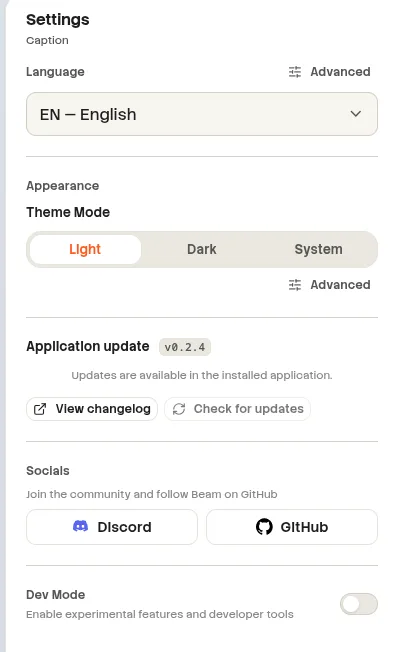
Screenshot pendingAdd the image at:
website/docs/public/screenshots/editor/settings-panel.webpLanguage and writing
| Setting | Values | Default |
|---|---|---|
| Language | Bulgarian, German, English, Spanish, French, Hindi, Italian, Japanese, Korean, Polish, Portuguese (Brazil), Russian, Vietnamese, Simplified Chinese, Traditional Chinese | A supported system or browser language; English fallback |
| Spell Check | On or Off under Advanced | On |
Appearance
Top bar, Sidebar, Properties, Canvas controls, and Timeline can each use the global scale or override it with 50%, 75%, 100%, or 125%. See the Recorder preferences reference for every preset color and radius value.
| Setting | Values | Default |
|---|---|---|
| Theme mode | Light, Dark, System | Light |
| Theme preset | Beam Sunset, Cyber Violet, Emerald Forest, Crimson Velvet, Oceanic Breeze, Amber Studio, Sakura Bloom, Slate Precision | Beam Sunset |
| Primary color | 10 presets or a custom color picker | #ff5a1f |
| Secondary color | 8 presets or a custom color picker | #6366f1 |
| Corner radius | 0, 6, 10, 16, 24 px, or Custom 0–32 px | 10 px |
| Pill radius | On or Off | Off |
| Surface | Default, Neutral, Slate, Deep | Default |
| Global UI scale | 50%, 75%, 100%, 125% | 100% |
Updates and links
| Area | Actions and states |
|---|---|
| Updates | Check, Available, Downloading, Downloaded, Not available, Error, Unsupported. |
| Downloaded update | Restart now becomes available after the download completes. |
| Error | Show or copy diagnostic details. |
| Changelog | Open the current update changelog. |
| Discord / GitHub | Open the Beam community or source repository. |
Dev Mode
Dev Mode is stored locally in the editor. It is intended for development and troubleshooting rather than normal editing.
| Control | Behavior |
|---|---|
| Dev Mode | Shows or hides the development options. |
| Recorder Tool | Opens an embedded Recorder HUD and can start a recording from the popover. |
| Copy system info | Copies diagnostic environment information. |
| Open DevTools | Toggles Electron developer tools. |