


Cursor
Cursor settings control the composition-wide pointer overlay and do not require a clip selection.
Cursor panel
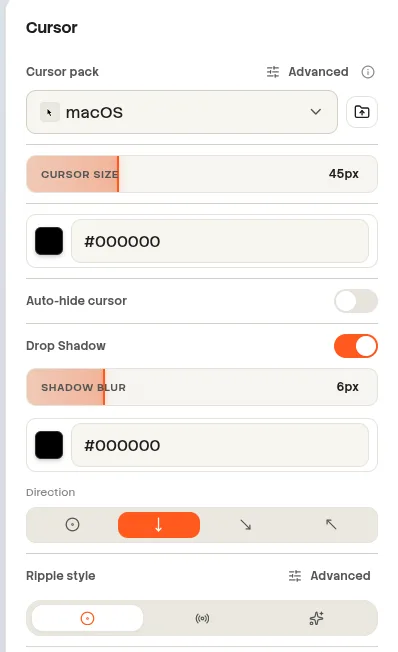
Screenshot pendingAdd the image at:
website/docs/public/screenshots/editor/cursor-panel.webpPack and cursor selection
| Property | Values | Behavior |
|---|---|---|
| Cursor pack | Built-in or imported pack | Automatic stays Automatic. A fixed cursor is preserved only when the same cursor ID exists in the new pack; otherwise Beam returns to Automatic. |
| Cursor mode | Automatic or a fixed cursor from the selected pack | Automatic uses recorded cursor shape changes. |
| Import pack | Supported cursor-pack files | Adds a custom pack to the available choices. |
| Reset | Reset cursor presentation | Keeps the selected pack and restores all other cursor defaults. |
Appearance
| Property | Values or range | Default |
|---|---|---|
| Size | 16–128 px | 45 px |
| Drop shadow | On or Off | On |
| Shadow blur | 1–24 px | 6 px after Reset |
| Shadow color | Color picker | #000000 after Reset |
| Shadow direction | All, Bottom, Bottom-right, Top-left | Bottom after Reset |
Click effects
| Property | Values or range | Default or behavior |
|---|---|---|
| Ripple style preset | Single Ring, Double Wave, Burst | Changes ripple style for left and right clicks; it does not enable the ripple. |
| Advanced sides | Left and Right | Configures the two buttons independently. |
| Spring | On or Off | On |
| Spring intensity | 0%–100% | 50% |
| Ripple | On or Off | Off for both click sides. |
| Ripple size | 10–80 px | 30 px |
| Ripple color | Color picker | Per click side. |
| Middle click | No separate editor control | Uses the left-click presentation. |
Motion
| Property | Values or range | Smooth preset |
|---|---|---|
| Preset | Focused, Smooth, Custom | Smooth |
| Smoothing | 0–1 | 0.67 |
| Spring mass | 0.5–2 | 1.29 |
| Motion blur | 0–1 | 0.4 |