


Export and sharing
Export renders the current composition directly to a local file and reports each stage of the job.
Choose a format
| Format | Video codec selection | Audio codec | Availability |
|---|---|---|---|
| WebM | First encodable of VP9, VP8, AV1 | Opus | Default format; requires an encodable video codec and, when audio is included, Opus. |
| MP4 | AVC / H.264 | AAC | Requires an AVC encoder. AAC uses WebCodecs when available, then Beam's Mediabunny AAC encoder fallback. |
Encoder availability
A format can be unavailable when the machine does not provide a compatible encoder. Beam reports this before or during export.
Choose a resolution
| Option | Availability | Output behavior |
|---|---|---|
| 720p | Native canvas height is at least 720 px | Targets 720 px high without upscaling. |
| 1080p | Native canvas height is at least 1080 px | Targets 1080 px high without upscaling. |
| Max | Always | Keeps the native output-canvas size. |
| All options | Not applicable | Preserve aspect ratio and round width and height to positive even numbers. |
Choose frame rate and quality
| Setting | Values | Default or recommendation |
|---|---|---|
| Frame rate | 24, 30, 60 fps | 60 for a source at or above 50 fps; 24 at or below 27 fps; otherwise 30. |
| Quality | Low, Medium, High | Medium |
| Low bitrate factor | 0.055 × width × height × fps | Clamped to 0.5–40 Mbps. |
| Medium bitrate factor | 0.095 × width × height × fps | Clamped to 0.5–40 Mbps. |
| High bitrate factor | 0.16 × width × height × fps | Clamped to 0.5–40 Mbps. |
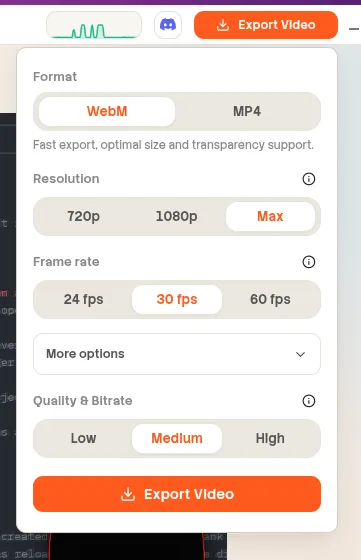
website/docs/public/screenshots/reference/export-panel.webpMore options
| Option | Values | Default | Behavior |
|---|---|---|---|
| Include Audio | On or Off | On | Off creates a silent file. Audio is also omitted when no enabled audio clip has positive duration. |
| Audio output | 48 kHz, stereo, 128 kbps | When audio is included | Enabled audio clips are mixed progressively into the selected container codec. |
Monitor the export
The progress view reports percentage and completed frame count and provides Copy Report. Cancel stops an active export. Closing or cancelling the destination picker ends the job without reporting an error. Live edits made after export starts do not change the in-progress file because Beam exports a snapshot.
| Stage | What Beam does |
|---|---|
| Validating assets | Checks the snapshot, local assets, formats, codecs, and render invariants. |
| Loading assets | Loads visual, audio, cursor, font, and background resources. |
| Encoding | Renders composition frames, mixes enabled audio, and writes encoded chunks. |
| Finalizing | Closes tracks and finalizes the media container and destination file. |
Validation and edge cases
| Condition | Result |
|---|---|
| Missing asset | Export stops with a validation issue identifying the relevant asset or clip. |
| Unsupported source or codec | Export reports an unsupported format, codec, or decode failure. |
| No compatible output encoder | The selected WebM or MP4 format is reported as not encodable on the device. |
| Animated GIF | Animated GIFs are not yet deterministically exportable. |
| Canvas 2D unavailable | Export stops because composition frames cannot be rendered. |
| Cancellation | The active worker and output stream are aborted and the incomplete export is not reported as a failure. |
| Audio mixer unavailable | Beam reports that offline audio mixing is unavailable in the Chromium build. |
Result and diagnostics
After a successful export, Beam reports the saved filename and provides Open File and Copy Report actions. If export fails, the user-facing message hides local filesystem paths while the detailed report retains configuration, codec, environment, progress, and bottleneck information for troubleshooting. Copy that report before asking for help on Discord or GitHub.