


AI Captions
Beam generates speech captions locally from an enabled audio clip. It downloads the selected Whisper model, transcribes on the device, and creates editable caption clips on the timeline.
Captions panel
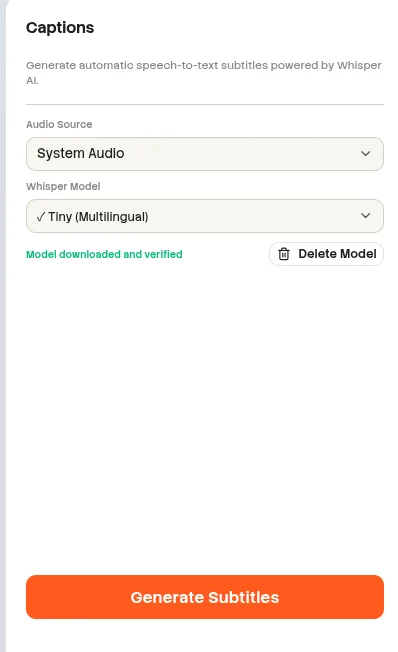
Screenshot pendingAdd the image at:
website/docs/public/screenshots/editor/captions-panel.webpAudio sources
| Source | When it appears | Selection rule |
|---|---|---|
| System audio | An enabled clip with the System role exists. | Identified as System Audio. |
| Microphone | An enabled clip with the Microphone role exists. | Identified as Microphone. |
| Imported audio | An enabled imported audio clip exists. | Uses the clip name. |
| Duplicate media URL | Two enabled clips reference the same audio URL. | Only the first source is offered. |
| No usable source | No enabled audio clip has a readable asset URL. | Generate remains unavailable. |
Whisper models
| Model | Languages | Performance guidance |
|---|---|---|
| Tiny | Multilingual | Default model. |
| Tiny .en | English | English-only model. |
| Base | Multilingual | No additional warning. |
| Base .en | English | English-only model. |
| Small | Multilingual | May be slow without WebGPU. |
| Small .en | English | May be slow without WebGPU. |
| Medium | Multilingual | Large download; WebGPU recommended. |
| Medium .en | English | Large download; WebGPU recommended. |
| Large v3 | Multilingual | Very large and slow without WebGPU. |
Model download and deletion
| State or action | Behavior |
|---|---|
| Missing | Download Model is available for the selected model. |
| Downloading | Beam reports downloaded and total bytes with a progress bar. |
| Ready | A check mark identifies the installed model and Delete Model becomes available. |
| Delete Model | Unavailable during download, deletion, or transcription. |
| Download error | The error is displayed and can be copied for diagnostics. |
Generate and regenerate
- Choose one of the enabled audio sources.
- Choose and download a Whisper model if it is not ready.
- Select Generate Captions. Beam decodes the source, converts it to mono 16 kHz audio, and limits it to the timeline duration.
- Partial transcription results update the composition while processing continues.
- The completed run selects the first generated caption for editing.
| Behavior | Rule |
|---|---|
| Sentence grouping | Ends a caption phrase at punctuation or after 12 words. |
| Minimum generated clip duration | 40 ms. |
| Regenerate | Replaces existing AI-generated captions and preserves manual captions. |
| Cancel | Stops model loading or transcription. |
| Close panel | Cancels the active transcription run. |
| Diagnostics | Reports elapsed time and exposes a copyable transcription report after processing. |
Local transcription
Whisper runs on the device. Caption generation does not require a cloud upload or API key.
Edit generated captions
Generated captions are regular editable caption clips marked as AI-generated. Their text, timing, and visual style can be adjusted through the Clip panel and timeline after generation.